
If you work with data, education CASE WHEN in SQL It's like a Swiss Army knife for your queries. It's one of those clauses that, once you discover it, you wonder how you ever managed without it. It allows you to insert conditional logic (such as "if this happens, then do that") directly into your analysis.
Instead of exporting thousands of rows to a spreadsheet and then segmenting customers or classifying sales manually, with CASE WHEN you can integrate this logic directly into the query. For you, this means faster reports, more accurate analyses, and ultimately smarter business decisions. This is the first step toward making your data analysis truly proactive.
Imagine a disorderly flow of data, like a line of cars on the highway. Without rules, it's just a long line of vehicles. CASE WHEN It acts as an intelligent sorting system: red cars on the left, blue cars on the right, all others straight ahead.
Similarly, in SQL, you can take data and, with a single clause, transform it into clean, organized information that is ready to be analyzed.
For an SME, this is not just a technical trick, but a concrete strategic advantage. Data analysis goes from being a reactive process, consisting of slow, manual steps, to a proactive and instantaneous one. The benefits for your business are clear:
In essence, the CASE WHEN is the first step in transforming your data from simple numbers into strategic insights. It is the bridge that connects a raw table to a report that allows you to make better decisions.
In the following sections, we will look at the exact syntax and practical examples to master this clause and solve concrete business problems.
To master conditional logic in SQL, it is best to start with the basics and thoroughly understand the structure of CASE WHENLet's start with its most direct form, the "Simple HOUSES", perfect for those taking their first steps.
This version is ideal when you need to check the values in a single column and assign a different result to each one. Simple, clean, effective.
The syntax is surprisingly intuitive. Let's take a practical example: imagine you have a column StatusOrder with text values such as 'Shipped,' 'In Process,' or 'Cancelled.' For your reports, it would be much more convenient to have a numerical code, wouldn't it?
Here's how you can convert that text into numbers:
SELECT IDOrder, OrderStatus, CASE OrderStatus WHEN 'Shipped' THEN 1 WHEN 'InProcessing' THEN 2 WHEN 'Cancelled' THEN 3 ELSE 0 -- This is our fallback END AS NumericStatus FROM Sales;
As you can see, HOUSES point to the column to be examined (StatusOrder). Each WHEN checks whether the value is equal to something specific, and THEN assigns the corresponding result.
The clause ELSE is essential. It is a kind of safety net: if none of the conditions WHEN is satisfied, assign a default value (here, 0), saving you from annoying results NULL. If you want to see similar tables in action, you can take a look at this database example.
The " Searched CASE" is a veritable toolbox. This is where the true flexibility of this instruction comes into play, because you are no longer limited to checking a single column.
With CASE Cercato, you can build complex conditions that evaluate multiple fields simultaneously using logical operators such as AND and OR, or comparison as > and <It is the perfect tool for implementing complex business logic directly in your query.
CASE Search does more than just check for equality. It evaluates whether a certain condition is true as a whole, giving you the power to create sophisticated rules that reflect the real dynamics of your business.
Let's say you want to categorize sales by amount and product category. Here's how you would do it:
SELECT ID, Product, Price, Category, CASE WHEN Price > 1000 AND Category = 'Electronics' THEN 'Premium Sale' WHEN Price > 500 THEN 'High Value Sale' ELSE 'Standard Sale' END AS SalesSegment FROM Sales;
This ability to intertwine multiple conditions is what makes CASE WHEN an irreplaceable pillar for any data analysis that wants to go beyond the surface.
Here is a table summarizing the key differences between the two syntaxes to help you choose the right one at the right time.
This table directly compares the two main forms of the CASE clause, highlighting when to use each and showing their structure side by side for immediate understanding.
Choosing between the two is not a question of "better" or "worse," but rather of using the tool that is best suited to the job at hand. For direct and quick checks, Simple CASE is perfect; for complex business logic, Search CASE is the obvious choice.
Visually, you can imagine CASE WHEN like a decision tree that takes raw data and routes it to well-defined categories, bringing order and clarity to your analyses.
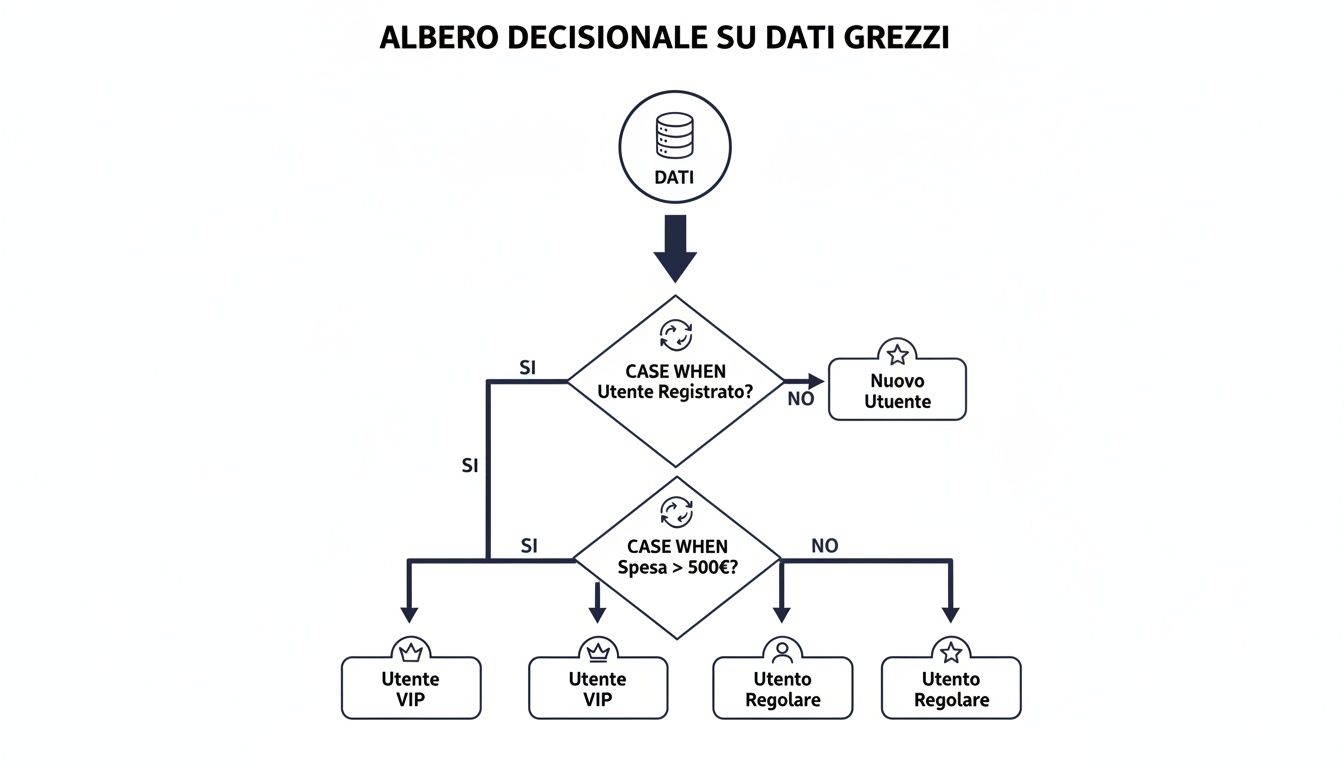
This image shows exactly that: how a single SQL statement can take each customer and, based on a couple of rules, direct them to the correct category. It's the power of conditional logic applied to data.
Now that syntax no longer holds any secrets, it's time to see CASE WHEN at work in real business scenarios. The true power of this clause emerges when you use it to transform numbers and codes into concrete insights, into real strategic guidelines for your company.
We will focus on two key applications: customer segmentation and product margin analysis. This is the first, decisive step toward making decisions based on data rather than instinct.
One of the most common goals for any business is to understand who their best customers are. Identifying high-, medium-, and low-value customer segments allows you to tailor marketing campaigns, optimize sales strategies, and improve customer loyalty.
With CASE WHEN, you can create this segmentation directly in your query. Imagine you have a table TurnoverCustomers with columns CustomerID and Total Purchased.
Here's how you could label every customer in one go:
SELECT CustomerID, TotalPurchased, CASE WHEN TotalPurchased > 5000 THEN 'High Value' WHEN TotalPurchased BETWEEN 1000 AND 5000 THEN 'Medium Value' ELSE 'Low Value' END AS CustomerSegment FROM CustomerRevenue ORDER BY TotalPurchased DESC;
With this single instruction, you have added a new column, Customer Segment, which enriches raw data with immediate business context. Now you can easily count how many customers you have for each segment or analyze their specific purchasing behaviors, improving the ROI of your marketing campaigns.
Another strategic use of case when sql is profitability analysis. Not all products contribute equally to profits. Classifying items based on their margins helps you decide where to focus your efforts, which ones to promote, and which ones you might want to discontinue.
Let's take a table Products with Selling Price and PurchaseCostFirst, we calculate the margin, and then we classify it.
SELECT ProductName, SalePrice, PurchaseCost, CASE WHEN (SalePrice - PurchaseCost) / SalePrice > 0.5 THEN 'High Margin' WHEN (SalePrice - PurchaseCost) / SellingPrice BETWEEN 0.2 AND 0.5 THEN 'Average Margin'ELSE 'Low Margin'END AS MarginCategoryFROM ProductsWHERE SellingPrice > 0; -- Essential to avoid division by zero
Here too, a single query has transformed simple price columns into a strategic classification, ready to be used in your reports to optimize your catalog and maximize profits.

Knowing how to write these queries is an invaluable skill. But what happens when requirements become more complex or when non-technical managers need to create these segments on the fly? This is where modern no-code data analytics platforms come into play.
This does not make SQL obsolete; on the contrary, it amplifies its value. The logic remains the same, but execution becomes automated and accessible to the entire team. The result is an immediate ROI: business teams can explore data and create complex segments without relying on IT, dramatically accelerating the process that takes from raw data to useful information for decision-making. Analysts, in turn, are free to focus on more complex problems, knowing that routine analyses are handled automatically.
Now that you are familiar with basic segmentation, it's time to take it to the next level. Let's explore how to transform CASE WHEN into a tool for complex analysis and advanced reporting, all within a single query.
One of the most powerful techniques is to combine CASE WHEN with aggregation functions such as SUM, COUNT or AVGThis trick allows you to create pivot tables directly in SQL, calculating specific metrics for different segments without having to run multiple queries.
Let's say you want to compare, in the same report, the total revenue generated by 'Premium' customers with that of 'Standard' customers. You can do it all in one go.
SELECT SUM(CASE WHEN CustomerSegment = 'Premium' THEN Revenue ELSE 0 END) AS PremiumRevenue, SUM(CASE WHEN CustomerSegment = 'Standard' THEN Revenue ELSE 0 END) AS StandardRevenue FROM Sales;
What's going on here? The function SUM sum the Turnover only when the condition specified in the WHEN is true. For all other rows, sum zero. It is an incredibly efficient way to aggregate data across multiple dimensions simultaneously, saving time and complexity.
Sometimes, business logic is not so straightforward. You may need to segment customers not only based on how much they spend, but also based on how often they buy. This is where multi-level logic comes into play, which you can implement. nesting a HOUSES inside another.
A HOUSES Nesting allows you to create precise subcategories. For example, we may want to divide our "High Value" customers into two further groups: "Loyal" and "Occasional."
SELECT CustomerID, TotalSpent, NumberOfPurchases, CASE WHEN TotalSpent > 5000 THEN CASE WHEN NumberOfPurchases > 10 THEN 'High Value - Loyal' ELSE 'High Value - Occasional'ENDWHEN TotalSpent > 1000 THEN 'Medium Value'ELSE 'Low Value'END AS DetailedSegmentFROM CustomerSummary;
Attention to readability: although extremely powerful, the HOUSES Nested queries can become a nightmare to read and maintain. If the logic exceeds two levels of depth, stop. It may be best to break the problem down into several steps, perhaps using Common Table Expressions (CTEs) to make everything cleaner.
Although CASE WHEN Although it is a well-established SQL standard, there are minor differences in implementation between different database management systems (DBMS). Knowing these differences is essential for writing portable code.
HOUSES practically everywhere: in clauses SELECT, WHERE, GROUP BY and ORDER BY.THEN are managed in a predictable manner.HOUSES to perfection, but also offers the non-standard function IIF(condition, value_if_true, value_if_false). IIF is a shortcut for simple binary logic (only one IF/ELSE), but CASE WHEN remains the best choice for readability and portability.Understanding these nuances will help you write SQL case when queries that not only work, but are also robust and easily adaptable to different technological contexts.
Write a CASE WHEN Getting it to work is only the first step. The real leap forward comes when you learn to make it not only correct, but also fast and error-proof. A slow or buggy query can ruin your reports and slow down business decisions.
Let's take a look at how to refine your technique, avoid the most common pitfalls, and optimize the performance of your analyses.
Here is a detail that is often overlooked: in a clause CASE WHENThe database analyzes the conditions in the exact order in which you wrote them. As soon as it finds a true one, it stops and returns the result.
This behavior has a huge impact on performance, especially when working with tables containing millions of rows.
The trick? Always put the conditions you think will occur most often first. This way, the database engine will make the least effort for most rows, drastically reducing execution time.
Even the most experienced analysts occasionally make classic mistakes. Knowing what these are is the best way to spot them immediately and correct them.
ELSEELSE and none of your conditions WHEN occurs, the result for that row will be NULL. This NULL Unexpected events can create a chain reaction, throwing subsequent calculations off course.SELECT Price, CASE WHEN Price > 100 THEN 'High' WHEN Price > 50 THEN 'Medium' END AS PriceRange -- If Price is 40, the result is NULL FROM Products;ELSE as a safety net to catch all unforeseen cases.SELECT Price, CASE WHEN Price > 100 THEN 'High' WHEN Price > 50 THEN 'Medium' ELSE 'Low' -- Here is our safety net! END AS PriceRange FROM Products;THEN must return the same data type (or compatible types). If you try to mix text, numbers, and dates in the same column generated by the HOUSES, the database will return an error.WHEN TotalPurchased > 1000 before WHEN TotalPurchased > 5000No customer will ever be labeled as a 'VIP', because the first condition will always 'capture' them first.Although CASE WHEN SQL is the universal standard—and almost always the best choice for readability and compatibility—some SQL dialects offer shortcuts.
In SQL Server, for example, find the function IIF(condition, value_if_true, value_if_false). It is convenient for simple binary logic, but HOUSES remains unbeatable for handling multiple conditions and for its clarity in complex scenarios.
In the vast majority of cases, stick to the standard CASE WHEN is the wisest choice. It ensures that your code is understood by everyone and works without surprises on different platforms.
Writing CASE WHEN queries is useful. But if you find yourself rewriting the same segmentation logic every week for monthly reports, or worse, if your marketing team asks you "can you add this segment too?" every other day, you have a scalability problem, not an SQL problem.
The conditional logic remains the same—whether you write it by hand or define it via an interface—but the time it takes you to do so changes dramatically. A query that takes 20 minutes to write, test, and document can be recreated in 2 minutes with a visual interface. Multiply that by all the analyses you do in a month, and you'll see where the time goes.
The real problem isn't writing SQL. It's that while you're writing queries, someone else on your team is waiting for the data to make decisions. And when the data finally arrives, the window of opportunity to act has often already narrowed.
Platforms such as ELECTE precisely this: the translation from business logic to queries. It does not eliminate the value of knowing how to write SQL—in fact, understanding what happens under the hood makes you much more effective in using any analytics tool. But it does take away the repetitive work.
The practical difference: instead of spending hours writing and debugging queries to segment customers, you spend 5 minutes defining the rules and the rest of the time analyzing what those segments mean for the business. It's not magic, it's simply removing the friction between "I have a question" and "I have an answer."
If you spend half your day extracting data instead of analyzing it, you've probably already figured out where the bottleneck is.
Platforms such as ELECTE CASE WHEN logic through no-code interfaces. Define segmentation rules with just a few clicks, without writing a single line of code. The result: analyses that used to take hours are now ready in minutes, accessible to the whole team without relying on IT.
Behind the scenes, the platform performs similar—and often much more advanced—conditional logic, freeing you from repetitive tasks. This allows managers and analysts to focus on the "why" behind the numbers, rather than the "how" of extracting them.
Even after seeing several examples, it's normal to still have some questions. We answer the most common questions that arise when you start using CASE WHEN in SQL.
The key difference: portability. The CASE WHEN is part of the SQL standard (ANSI SQL), which means that your code will work on virtually any modern database, from PostgreSQL and MySQL to SQL Server and Oracle.
Education IF(), on the other hand, is often a specific function of a certain SQL dialect, such as SQL Server's T-SQL. Although it may seem shorter for a simple binary condition, CASE WHEN It is the choice of professionals for writing code that is readable and works everywhere without modification.
Absolutely. It's not the most common use, but in certain scenarios it's incredibly powerful for creating complex conditional filters. Imagine, for example, that you want to extract all "premium" customers, or only "standard" customers who haven't made a purchase in over a year.
Here's how you could set up the logic:
SELECT NomeCliente, UltimoAcquistoFROM ClientiWHERECASEWHEN Segmento = 'Premium' THEN 1WHEN Segmento = 'Standard' AND UltimoAcquisto < '2023-01-01' THEN 1ELSE 0END = 1;
In practice, you are telling the database: "only consider rows for which this complex logic returns 1."
Theoretically, the SQL standard does not impose a strict limit on the number of WHENIn reality, however, a query with dozens of conditions becomes a nightmare to read, maintain, and optimize.
If you find yourself writing a HOUSES that never ends, take it as a wake-up call. There is probably a smarter way to solve the problem, perhaps using a lookup table (a mapping table) to make the query cleaner and more efficient.
Here we need to be careful. The values NULL in SQL are special. A condition such as WHEN Column = NULL It will never work as you expect, because in SQL NULL is not equal to anything else, not even itself. To check whether a value is NULL, the correct syntax is always WHEN Column IS NULL.
In these cases, the clause ELSE becomes your best friend. It allows you to manage all cases not covered by WHEN, including NULLUse it to assign a default value and you will avoid unexpected results in your analyses.

.svg)


.svg)
.svg)




.png)